
Blog
Hold, rolling reserve and gateway balances: how Sensus Tech structures merchant balances in payment orchestration
For many finance teams, growth brings more dashboards, more access rights, more settlement requests and more reconciliations.
At Sensus Tech, we've found that the root cause often lies deeper: in how the platform counts and separates balances.
This article explains why that happens. We'll look at what hold and rolling reserve are, why a "one balance per currency" model creates extra dashboards and manual work, and how a multi-layer balance model helps keep different financial flows organised within a single dashboard.
Why merchants end up with five dashboards
A typical PSP starts with a simple model: one dashboard for the merchant and one balance for each currency. Every euro, whether it comes from cards or Open Banking, ends up on the same EUR balance.
There is nothing wrong with that model until the merchant starts growing. As new payment methods are added, they often need to be processed, settled or reported on differently. What looked simple at the beginning quickly becomes harder to manage.
Separating money means opening a new dashboard
Say a merchant wants to see how much EUR came from cards and how much from Apple Pay. Or it needs to keep apart money that belongs to different legal entities or different risk profiles.
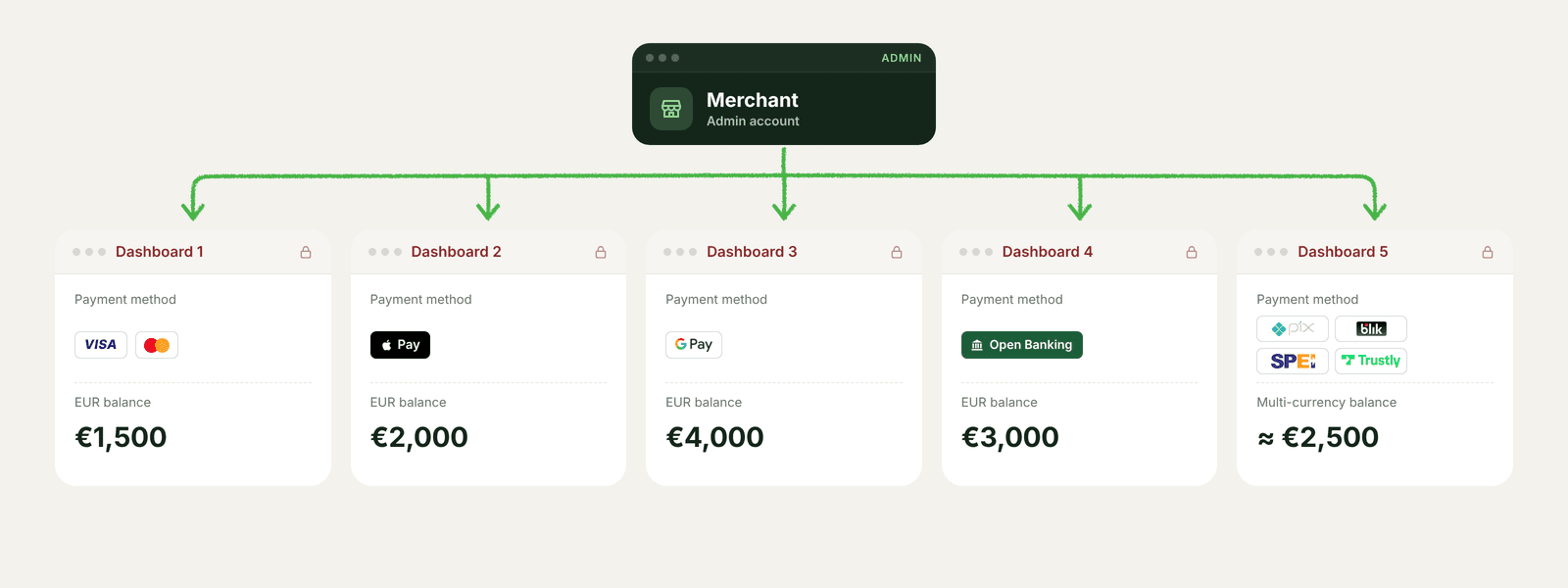
One shared EUR balance cannot do that, so each flow gets its own dashboard. One for EUR cards. Another for Apple Pay in EUR. Add more methods, and one merchant can end up with as many as five dashboards.
Withdrawing money becomes a marathon
To withdraw funds, the finance team has to go through the same sequence in every dashboard: log in, create an exchange request and submit a settlement request. With five dashboards, a single withdrawal turns into fifteen separate actions.
Access turns into its own project
Each dashboard comes with its own access settings. So, when a new employee joins the team, access needs to be granted separately in every dashboard. And when someone leaves the company, those permissions need to be removed everywhere. If there are as many as five dashboards, that's five separate sets of access permissions to keep track of.
Netting stops making sense
Netting allows a merchant to use EUR card deposits to fund EUR card payouts from the same flow of money. But when Apple Pay in EUR is added to the same dashboard, things become less straightforward.
Both payment methods feed into the same EUR balance. At any given moment, it becomes impossible to tell which funds came from card payments and can be used for payouts, and which came from Apple Pay and should leave only through a settlement request.
To prevent those funds from mixing, the provider is forced to place the methods in separate dashboards, even if the merchant never asked for it.
All four problems come back to the same issue: the platform only supports one balance per merchant per currency. Every new reason to separate money means another dashboard and another login.
What a merchant balance can look like instead
If every new financial flow requires a new dashboard, sooner or later the dashboard becomes the problem. At Sensus Tech, we wanted to solve that differently. Instead of creating another dashboard every time funds need to be separated, we built a balance model that keeps different financial flows in one place.
The result is two types of balances working side by side on a single Balances page:
The wallet: money that is ready to use
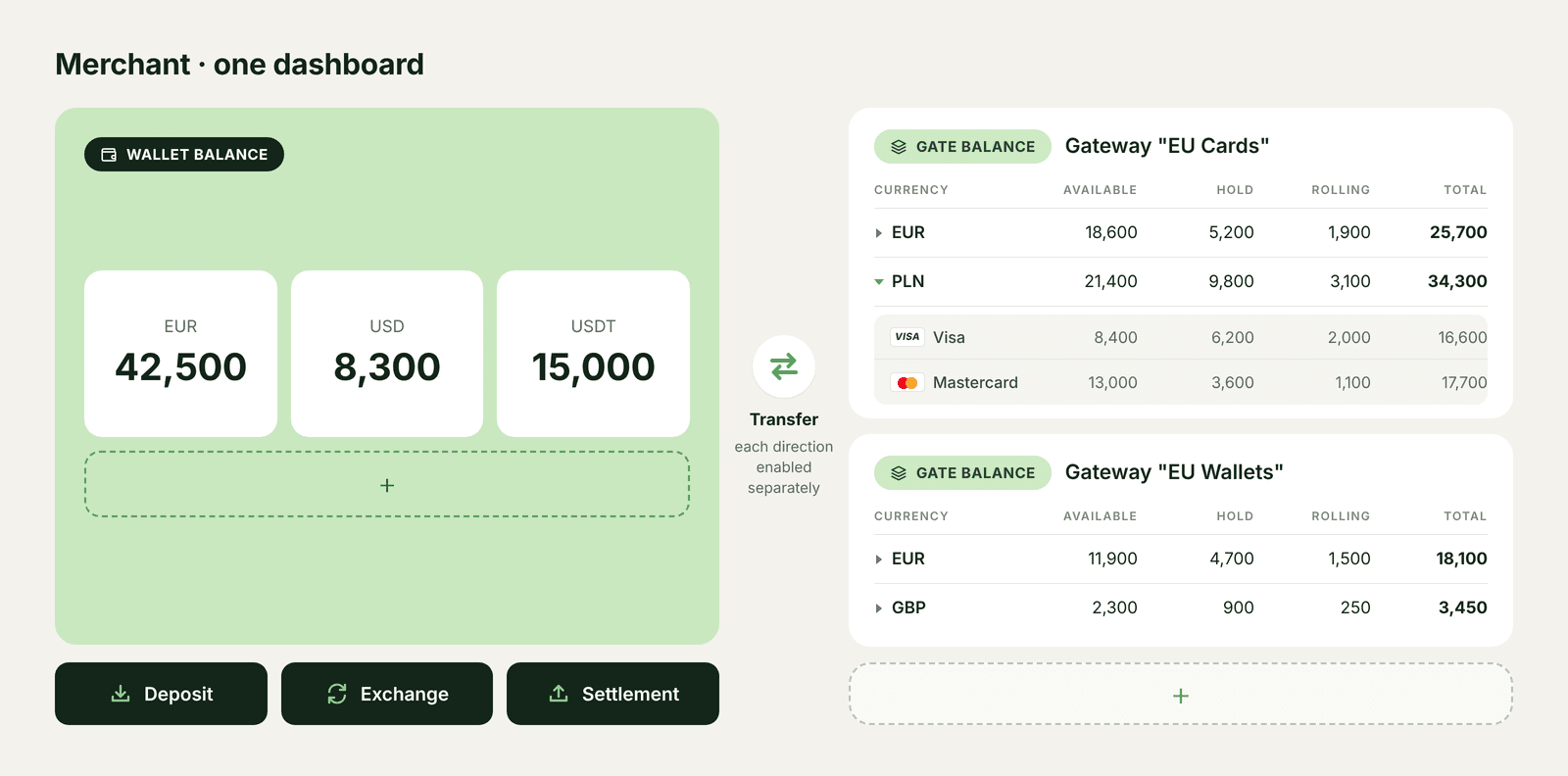
Think of the wallet as the place for money that is ready for the next step. It keeps one balance for each currency and contains only money that is available to the merchant. Nothing in the wallet is on hold or locked in rolling reserve.
From the wallet, a merchant can:
- top up funds, for example via cryptocurrency or bank transfer
- exchange currencies
- withdraw funds through a settlement request
- transfer funds between the wallet and gateways
Gateways: where processing happens
A gateway is where a merchant's payment methods come together, whether those are deposit methods, payout methods or both. A merchant can have as many gateways as needed. Each gateway has its own set of payment methods and its own balance in every currency.
Within each gateway balance, funds are split into three categories:
| Part | What it means |
|---|---|
| Available | Money that can fund payouts or be transferred to the wallet |
| Hold | Money locked for the settlement period defined by the provider |
| Rolling reserve | A percentage of incoming funds held as a reserve for a defined period |
The gateway balance can also be expanded to show hold and rolling reserve for each payment method separately. So, cards and Apple Pay can sit in the same gateway and the same currency, while the merchant still sees exactly how much money is locked for each payment method.
Transfers: the switch that keeps flows apart
Keeping different financial flows separate is not just about where money sits. It is also about where that money is allowed to go. Money moves between a gateway and the wallet through transfers. The payment provider operating the platform (the tenant) can decide whether transfers are allowed in each direction:
- gateway → wallet
- wallet → gateway
These settings are configured separately for every gateway. That means two gateways can work very differently, even within the same dashboard. One flow might be allowed to move funds into the wallet for settlement, while another can be used only for payouts. As a result, different financial flows stay separate without requiring separate dashboards.
Following one 1,000 EUR card payment
So, what does all of this look like in practice?
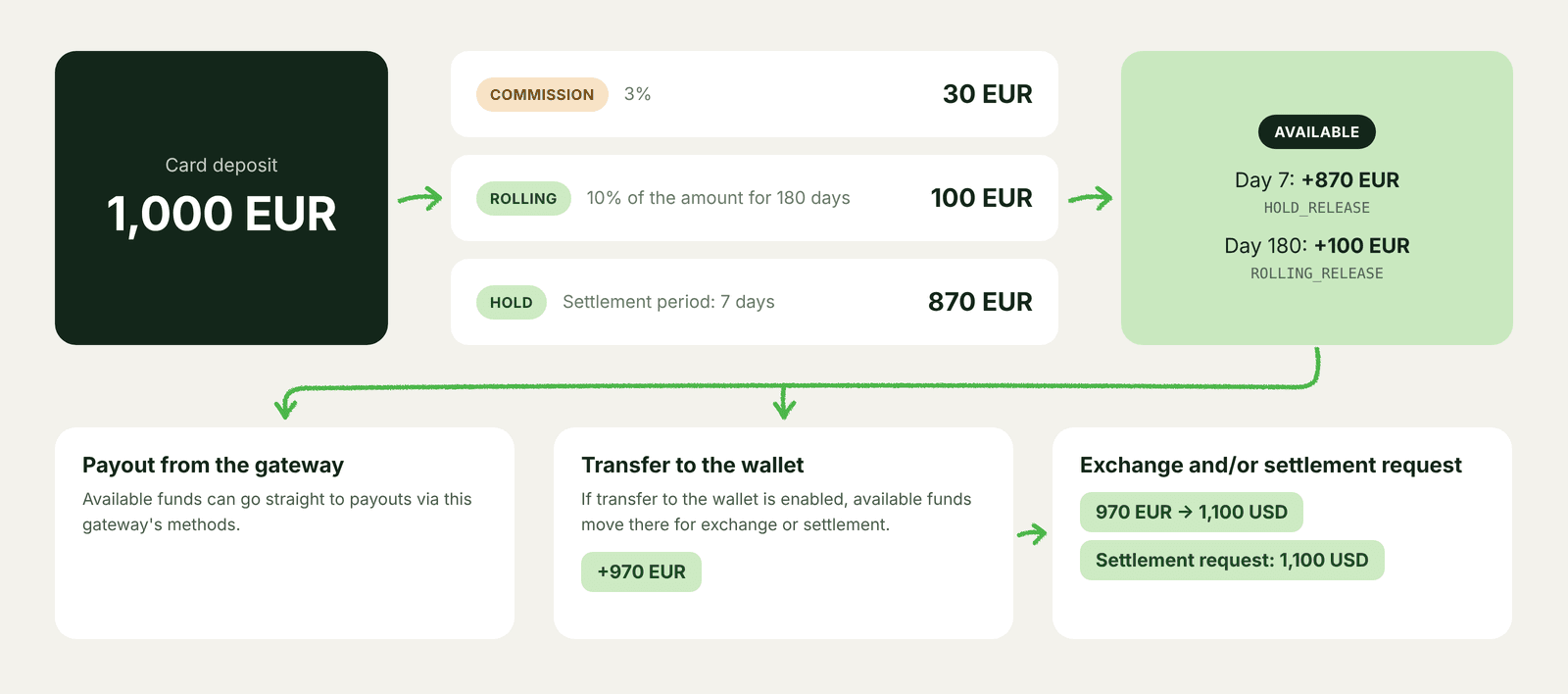
Let's take a single card payment for 1,000 EUR and follow it through the balance.
For this example, we'll assume:
- a processing fee of 3%
- a hold period of 7 days
- a rolling reserve of 10% for 180 days
| When | What happens | Amount | Where the money sits |
|---|---|---|---|
| At payment | Fee is deducted | 30 EUR | Goes to the tenant |
| At payment | 10% is set aside | 100 EUR | Rolling reserve |
| At payment | Remaining funds are locked | 870 EUR | Hold |
| Day 7 | Hold is released automatically | 870 EUR | Available |
| Day 180 | Rolling reserve is released | 100 EUR | Available |
As the table shows, not all funds become available immediately. Part of the payment is deducted as a fee, part is placed in rolling reserve, and the remaining amount stays on hold until the settlement period ends.
What happens next depends on how the gateway is configured.
If the gateway includes a payout method in EUR, available funds can be used directly for payouts. If gateway-to-wallet transfers are enabled, those funds can move to the wallet, be exchanged into another currency and then withdrawn through a settlement request.
Every step along the way, from the fee and the hold to the reserve, the releases, the transfer and the exchange, is recorded as a separate transaction entry. That makes it possible to see where the money came from, where it moved and why.
When it is time to reconcile balances, any amount can be traced back to the operation behind it.
Four ways to set up transfers
The same gateway can be configured in different ways depending on how funds should move through the platform.
Some merchants use incoming deposits to fund payouts. Others transfer funds to the wallet and withdraw them through settlement requests. In some cases, one gateway needs to support both options.
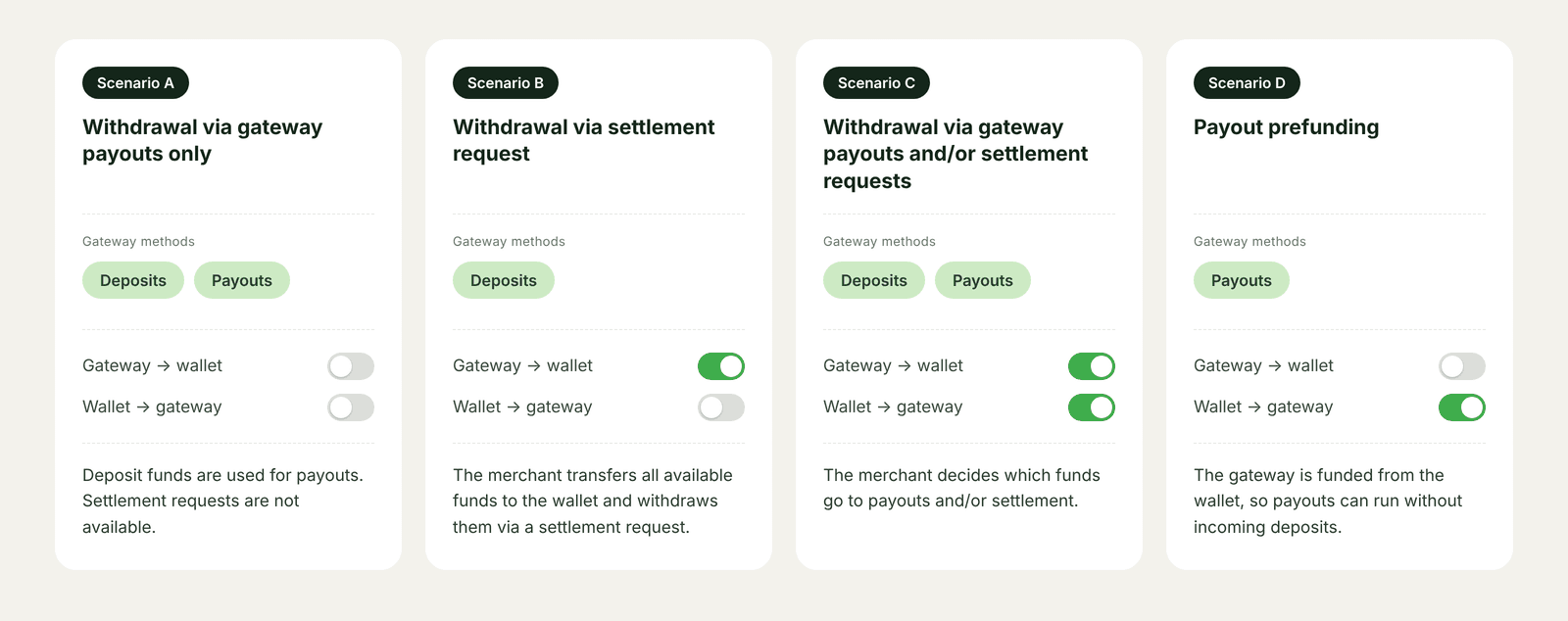
| Scenario | Methods on the gateway | Gateway to wallet | Wallet to gateway | What it means in practice |
|---|---|---|---|---|
| A. Classic netting | Deposits and payouts | Off | Off | Deposit funds can leave only through payouts |
| B. A gateway without payout methods | Deposits only | On | Off | Available money moves to the wallet and is withdrawn through a settlement request |
| C. Freedom of action | Deposits and payouts | On | On | The merchant can withdraw through payouts or through a settlement request |
| D. Payout prefunding | Payouts only | Off | On | The gateway is funded from the wallet so payouts can run without incoming deposits |
Different flows can follow different rules, while still remaining within the same dashboard. No additional dashboards are required, and funds remain separated according to the merchant's needs.
Two situations from practice
“We want to see each EUR method separately”
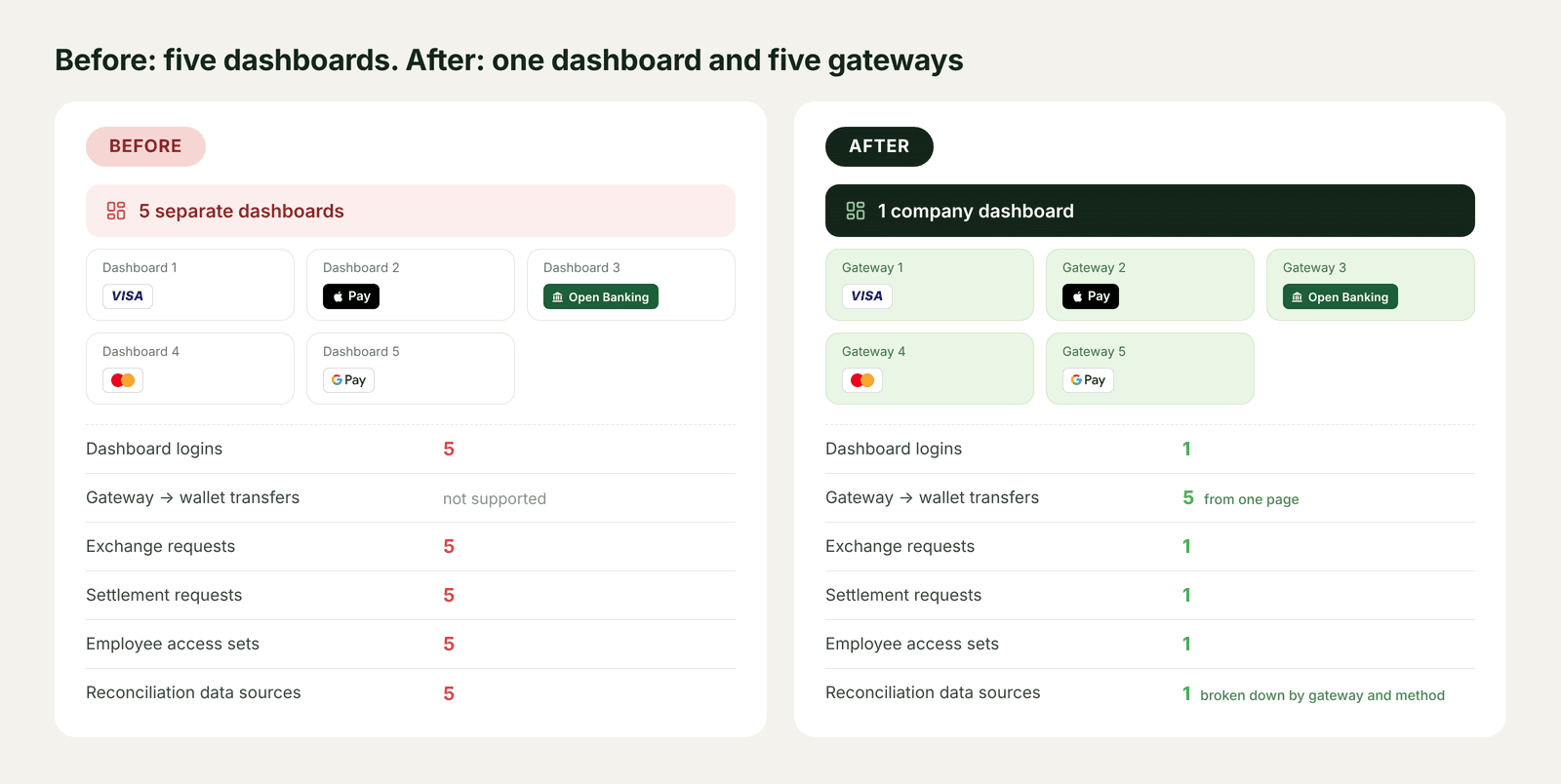
Let's take a merchant that accepts EUR through, for example, Visa, Apple Pay, Open Banking, Mastercard and Google Pay. The finance team wants a separate balance for each payment method.
In a one-balance-per-currency model, that usually means five dashboards, five access sets, five exchange requests, five settlement requests and five reconciliation sources.
With a multi-layer model, the merchant keeps a single dashboard and gets five gateways, one for each payment method. To withdraw funds, the team can transfer the available balances from those gateways into the EUR wallet from the same screen, then create a single exchange request and a single settlement request.
Five gateways are not always necessary, however.
If the team simply wants visibility into hold and rolling reserve for each payment method and is comfortable keeping available funds together, one gateway containing all five methods is enough. The method-level breakdown is already there.
“We run netting, but one method must go through settlement”
Now consider a different scenario.
A merchant uses netting, where EUR card deposits fund EUR card payouts. At the same time, another EUR payment method must be withdrawn only through settlement requests.
Traditionally, that would require two dashboards: one for card deposits and payouts, and another for the settlement-only method. Otherwise, it becomes impossible to determine which part of the EUR balance can be used for payouts and which part should be withdrawn through settlement.
With a multi-layer model, both flows can stay within the same dashboard.
Gateway 1: "Cards EUR Netting"
- card deposits
- card payouts
- gateway → wallet transfers disabled
Funds can be used only for payouts.
Gateway 2: "Deposit-only EUR"
- deposit methods only
- gateway → wallet transfers enabled
Funds can be transferred to the wallet and withdrawn only through a settlement request.
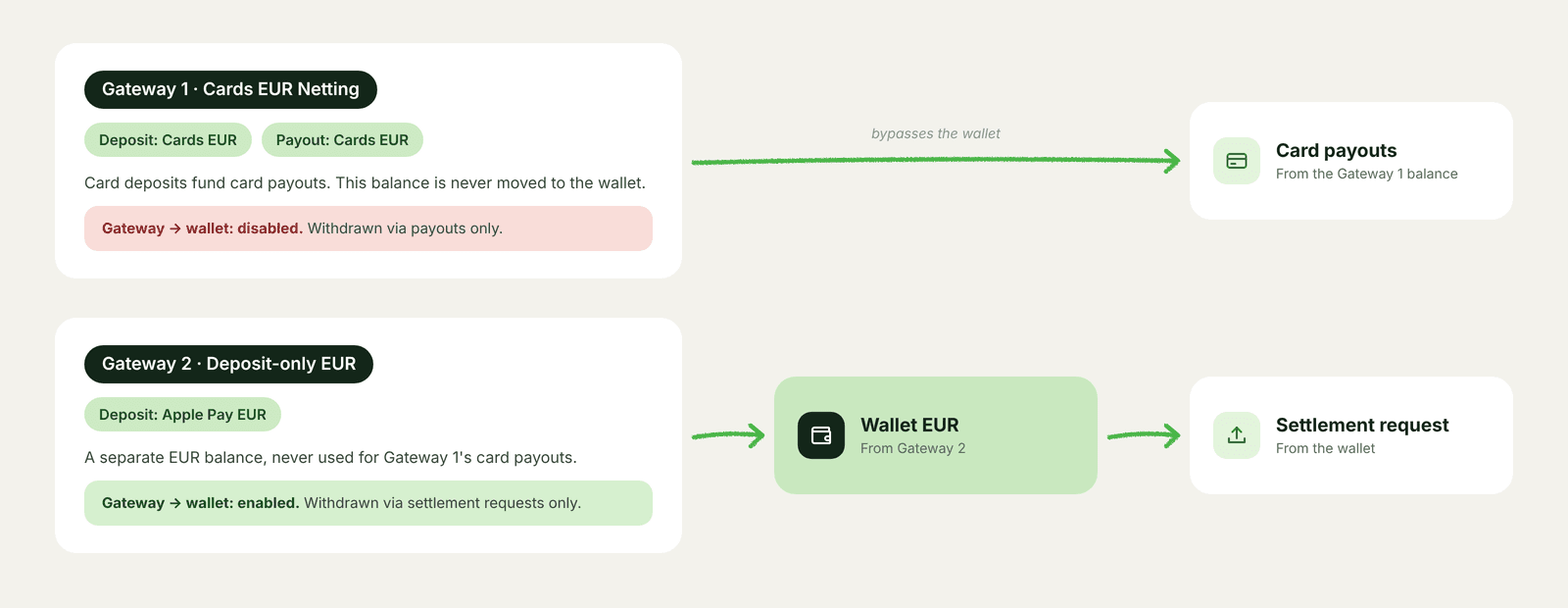
The two flows cannot mix because they sit on different balances, and transfer settings define how each balance can be used.
The provider does not need to monitor the separation manually, and the merchant does not need to maintain multiple dashboards.
Balances are not just numbers in a dashboard
They are how a platform lets a merchant organise its money. And as long as a platform supports only one balance per currency, every new requirement often means another dashboard, another set of access permissions or another manual step. That extra manual work is where errors and financial risk begin to appear.
A multi-layer balance model works differently:
- Gateways keep financial flows separate when they need different rules
- Method-level visibility shows exactly what funds are on hold and in rolling reserve
- The wallet brings together funds that are ready for exchange, settlement and gateway funding, while transfer settings define how money can move between those balances
The result is simpler day-to-day operations: fewer dashboards, fewer logins and fewer statements to reconcile. So, the team can spend less time on routine admin work.
If your team is spending more time managing dashboards, access rights and reconciliations than improving payment operations, it may be time to take a closer look at the balance model behind it.
Book a demo and see how different financial flows can be managed within a single dashboard.